
Table of Contents
- What Makes a Garage Door Opener Secure in 2026
- Smart Garage Door Opener Security Features to Prioritize
- How to Prevent Garage Door Hacking
- Garage Door Opener Battery Backup Benefits During Outages
- Keypad, Remote, and Smartphone Access: Managing User Permissions
- Installation, Firmware Updates, and Professional Tune-Ups
- Frequently Asked Questions
Last Updated: September 21, 2026
What Makes a Garage Door Opener Secure in 2026
The best garage door opener for security combines unpredictable access codes, encrypted signals, and a drive system that resists forced entry. This guide from Afford A Door breaks down the features that matter.
Rolling Code Technology and Encryption
Rolling code technology generates a new access code with every use, so a captured signal cannot be replayed. Older fixed-code remotes broadcast the same code every time, making them easy to intercept.
Belt Drive vs. Chain Drive for Quiet Operation
Belt drives use a rubber belt to move the trolley; chain drives use a metal chain. Belt drives run noticeably quieter, which matters if a bedroom sits above or beside the garage. Chain drives cost less and handle heavier doors well but rattle more over time.
Smart Garage Door Opener Security Features to Prioritize
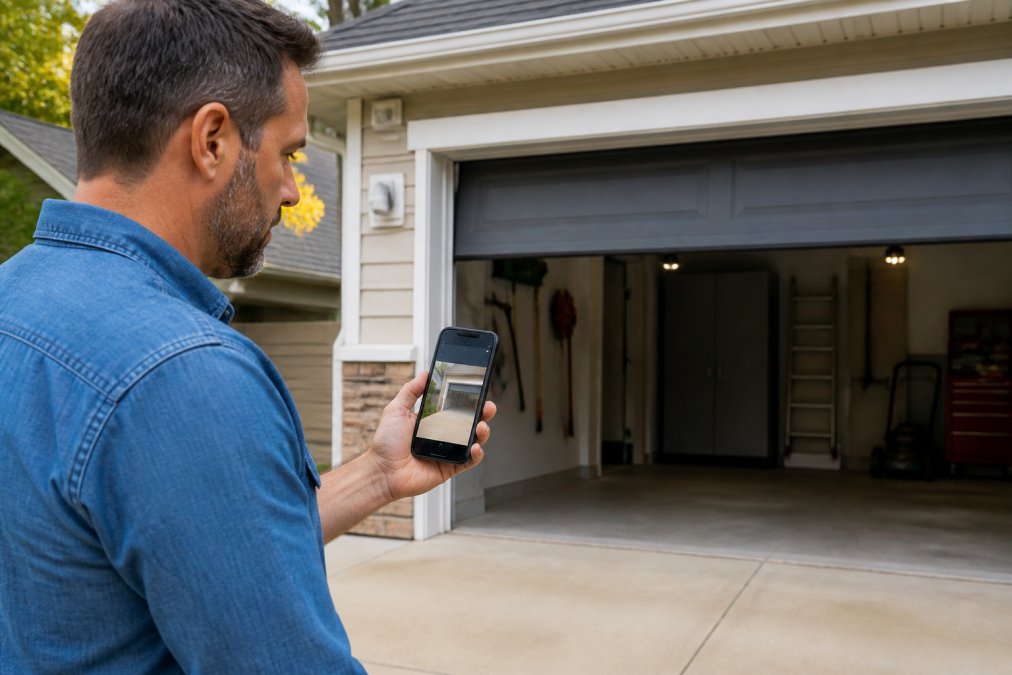
Prioritize real-time notifications, activity logs, and an integrated camera that shows the garage without a trip outside.
Real-Time Alerts, Activity Logs, and Two-Way Audio
Real-time notifications tell you the moment the door opens or closes, even at work. Activity logs record who opened it and when, useful with contractors or a cleaning service.
Integrated Cameras and Motion Detection
An integrated camera removes the need for a separate unit and keeps the feed in the same app. Motion detection can trigger a recording or alert when someone approaches.
Pair the opener’s camera with your existing home automation hub so a single alert covers the garage, driveway, and front door. Most hubs let you group devices into one routine, which cuts down on notification fatigue.
How to Prevent Garage Door Hacking
Preventing garage door hacking comes down to three layers: locking down the wireless signal, hardening the opener’s network, and reinforcing the door itself. Most break-ins exploit the easy path, a replayed remote code, a default app password, or a door that lifts with a pry bar.
What Encryption Standard Your Opener Should Actually Use
Rolling code (hopping code) changes the transmitted code with every press, defeating a simple replay attack. But it does not encrypt the payload, so rolling code alone can still be vulnerable to advanced interception.
Look for these signal protections, in order of strength:
- Rolling code with a long code length. A 40-bit rolling code is common; longer codes are harder to brute-force.
- Encrypted wireless transmission. Some openers add encryption on top of rolling code so the command is unreadable in transit. Ask about this if the spec sheet only says “rolling code.”
- Frequency agility. Openers that shift between frequencies are harder to jam than fixed-frequency units.
Hardening the Network and Account Layer
A Wi-Fi enabled opener is a small computer on your network and should be treated like one. The account is usually the soft spot, not the radio signal.
- Change the default password on the opener’s app and your router. Default credentials are published in manuals and are the first thing an attacker tries.
- Turn on two-factor authentication if the app supports it, it blocks the most common account-takeover path.
- Install firmware updates as soon as available; skipping them leaves a documented weakness in place.
- Put the opener on a separate network or guest Wi-Fi so a compromised opener is not a doorway into your home network.
- Set user permissions so guests and family have limited access, and revoke access when no longer needed.
- Avoid connecting the opener to a public or shared network.
Integrating the Opener With Your Existing Home Security System
An opener that talks to your broader alarm system gives you one place to see and respond to activity, instead of three apps each telling a partial story.
- Alarm systems with garage support. Many panels accept a garage door controller as a zone, so opening the garage can trigger a disarm event and an unexpected opening can trigger an alarm. Check panel support before buying.
- Camera ecosystems. If you already run cameras from a major brand, look for an opener that integrates with a compatible hub. A camera watching the garage plus a door reporting its own state are far more useful together.
- Automation hubs. A hub that speaks to the opener, lights, locks, and cameras lets you build rules like “if the garage opens after 11 p.m., turn on the entry lights and send an alert.”
- Voice assistants. Treat voice control as a convenience layer, not a security layer. Anyone within earshot can issue the command unless you require a PIN.
Before buying, check the opener manufacturer’s integration page for the specific alarm panel, camera brand, or hub you already own. “Works with smart home” on a product page often means one ecosystem, not all of them.
Physical Reinforcement Accessories That Add a Second Layer
Digital security does not stop someone who forces the door. Forced entry prevention starts with physical hardware:
- A slide lock or deadbolt securing the door to the track, the single most effective add-on, because it stops the door being lifted even if the opener is defeated.
- Reinforced brackets on the top panel, where pry attempts usually start.
- A wireless keypad mounted out of easy reach of the door’s edge so it cannot be observed from outside.
- Obstruction sensing kept in working order so the door reverses correctly.
- A door or tilt sensor that reports the door’s actual position, catching the case where the opener reports “closed” but the door is not.
A slide lock or deadbolt that is engaged while the opener runs will damage the door and the opener. If you add a manual lock, make it a habit to disengage it before opening, or choose an automatic deadbolt that ties into the opener’s state.
Garage Door Opener Battery Backup Benefits During Outages
Battery backup keeps the opener working when the power goes out, so you are not trapped or forced to disengage the door by hand. It earns its place during storm season.
A backup battery that has never been tested is not real protection. Test it twice a year by cutting power at the breaker and running the door once. A dead battery discovered during an outage is a problem you cannot fix in the moment.
Keypad, Remote, and Smartphone Access: Managing User Permissions
Managing access well means giving each person only the entry they need and revoking it fast. A wireless keypad, a remote, and smartphone connectivity each serve a different purpose and should be tracked as its own access point.
Keypad and Keyless Entry: Codes That Actually Get Changed
Keyless entry through a keypad is convenient for family and trusted visitors. The risk is a shared code that never changes or is easy to guess.
- Set a unique code per person where the opener allows it, so you can revoke one person without changing everyone else’s.
- Avoid codes tied to addresses, birthdays, or the last four digits of a phone number, the first codes someone tries.
- Change codes when someone moves out or a service ends. Treat a code like a key: if you would not hand out a physical key, do not hand out the code.
- Mount the keypad out of easy reach of the door’s edge, and consider a covered or backlit model that is hard to observe from the street.
Remotes: Rolling Code Is the Floor, Not the Ceiling
Remote access through a handheld remote is the most-used access point in most homes, and the one most likely to be lost or stolen.
- Use rolling code remotes only. A fixed-code remote can be captured and replayed, defeating the point of a secure opener.
- Track how many remotes are paired. If you cannot account for every remote, clear the opener’s memory and re-pair only the ones you have, standard when moving into a home with an existing opener.
- Consider a remote with a built-in PIN or a keypad remote for the car, so a stolen remote is not immediately usable.
- Do not leave a remote in an unlocked car or a visible spot in a driveway, a common way remotes end up in the wrong hands.
Smartphone App Access: The Account Is the Gate
Remote access through the app lets you open the door from anywhere, useful for deliveries and trusted visitors when you are out. It also means your account is the gate.
- Keep user permissions tight. Most apps let you assign roles, full control, open-only, or view-only. Give the minimum each person needs.
- Turn on two-factor authentication, the single highest-value setting in the app, because it blocks the most common account-takeover path.
- Review authorized users every few months and after any change in household or service providers.
- Use an auto-close timer so a door left open does not stay open, one of the most effective habits for preventing an open garage from becoming an open invitation.
- Check whether the app supports temporary or scheduled access. A time-limited code for a delivery or contractor is safer than a permanent code you forget to revoke.
Tying Access Into Your Broader Security Ecosystem
Access management gets stronger when the opener is not an island. Integrating with an alarm system, camera ecosystem, or automation hub lets you build rules that catch cases a single app misses.
- Alarm integration. If the garage door is a zone on your alarm panel, an unexpected opening can trigger an alert even when the opener’s app is not open.
- Camera correlation. A camera that records when the door opens gives a visual record to match against the activity log. If the log says the door opened at 2:14 p.m. and the camera shows no one there, investigate.
- Automation rules. A hub can tie the opener to lights, locks, and notifications, for example, if the garage opens while the alarm is armed, turn on the entry lights and send a push alert.
- Voice assistants. Treat voice control as a convenience layer, not a security layer. Require a PIN if supported, and do not rely on voice as your only way to open the door.
| Access Method | Best For | Security Step |
|---|---|---|
| Wireless keypad | Family, trusted visitors | Unique code per person; revoke on change |
| Handheld remote | Daily drivers | Rolling code remotes only; account for every remote |
| Smartphone app | Remote access, deliveries | Two-factor authentication; minimum permissions |
| Temporary or scheduled code | Contractors, deliveries | Time-limited; expires automatically |
| Activity logs | Reviewing who entered | Check monthly and after any access change |
| Alarm or hub integration | Cross-device rules | Tie opener state to lights, locks, alerts |
The strongest access setup is not the one with the most features. It is the one where you can name every person who has access, revoke any of them in under a minute, and see a record of what happened when you were not looking.
Installation, Firmware Updates, and Professional Tune-Ups
Proper installation and regular tune-ups matter as much as the feature list. A well-mounted unit with correct installation hardware keeps sensors aligned and motor longevity intact.
Frequently Asked Questions
What is the most secure garage door opener?
The most secure openers combine rolling code technology, encrypted Wi-Fi, and battery backup. Rolling codes change with every use, so a captured signal cannot be replayed later. Look for openers with two-way authentication, activity logs, and firmware updates. Pair the opener with a reinforced deadbolt and a monitored camera for layered protection. Afford A Door can recommend models that fit your existing door and security setup.
Can hackers open my garage door remotely?
Yes, if the opener uses outdated fixed codes or a poorly secured Wi-Fi connection. Older openers that rely on dip switches are vulnerable to code grabbing. Smart openers with rolling code technology and encryption are much harder to intercept. To reduce risk, change default passwords, enable two-factor authentication where available, and keep firmware updated. A professional security assessment can identify weak points in your current system.
Are smart garage door openers more secure than traditional ones?
Smart openers offer more security features than traditional models, including real-time notifications, activity logs, and remote access control. However, they also introduce digital risks if not configured properly. Traditional openers with rolling codes are not inherently insecure, but they lack monitoring and remote management. The best choice depends on whether you want visibility and control or simply reliable physical security.
Do I need a battery backup for garage security?
A battery backup keeps your garage door operational during power outages, which matters for both convenience and security. If the power goes out and your door is stuck open or closed, you may be unable to secure your home or leave. Many smart openers include battery backup as a built-in feature. For older openers, an add-on backup system can provide the same benefit. Ask a technician whether your current opener supports one.